
How To Clean Google Search History & Browsing History
Source: myactivity.google.com

Tech news by email, once a week
Unsubscribe any time. Privacy policy
Google is great for things like winning arguments in the bar, but the problem is, the more you ask it, the more it remembers. Therefore you have to clear it on a regular basis to stop Google from knowing too much about you and serving up “relevant ads”. Add in the “nosey roommate” as well, and purging Google on a weekly or monthly basis becomes even more essential.
Here are a variety of ways to remove your Google search history on various platforms.
How To Clean Google Search History On a Computer
- Go to Google’s Web History Page.
- Log in to your Google account.
- Click the “Delete” menu next to the search bar. You can delete the last hour, the last day, a custom range, or all time.
Delete Individual Items From Google’s Web Activity Page
On Google’s Web History Page you will also find a list of day-by-day entries. Scroll down the list to check past searches. Google knows a lot about us and you can see how it tracks your history on “My Activity” page.
You can also read our article to know more about Google’s infamous tracking methods.
- Find the entry you want to remove.
- Click the “X” on the entry (or the “Delete” option in its menu) and confirm to remove it from your activity.
Delete Your Entire Search History From Google’s Web Activity Page
You can also delete your entire history from Google. Here is how to do it quickly and easily.

- Go to Google’s Web Activity page.
- Click the “Delete” menu next to the search bar.
- Select “All time”.
- Confirm the deletion. This removes activity from all Google products linked to your account.
Clear Chrome Synced Data
- To remove your synced data in Chrome, first go to the dashboard.

- Click the Reset Sync button at the bottom.

- Be aware though that if you sign into your Google account again, everything will sync again.

Do You Not Want Google To Track Your Search History?
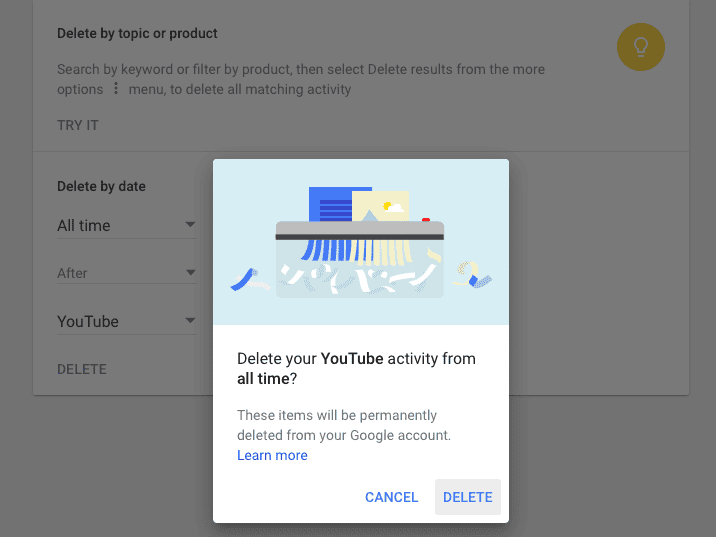
To stop Google from tracking your search history, you can “turn off” your search history. Here is how you can do it:
- Go to Google’s Web Activity page.
- Click on “Web & App Activity” (under activity controls) in the menu.
- Click “Turn off”. You can also choose “Turn off and delete activity”.
- Confirm by clicking “Turn off” or “Pause” in the prompt window (as shown in the image above).
Google also offers an auto-delete option on the same page, which removes activity older than a period you choose (3, 18 or 36 months).
How To Remove Your Google History On Android & iOS
Deleting your Google history on Android and iOS smartphones is also pretty easy.
Remove The Entire iOS Search History In Safari
- Go to Settings on your iPhone or iPad.
- Tap on Apps, then Safari (on older iOS versions, tap Safari directly).
- Select Clear History and Website Data to delete history and cookies.
- To eliminate other saved information, go to Settings > Apps > Safari > Advanced > Website Data > Remove All Website Data.
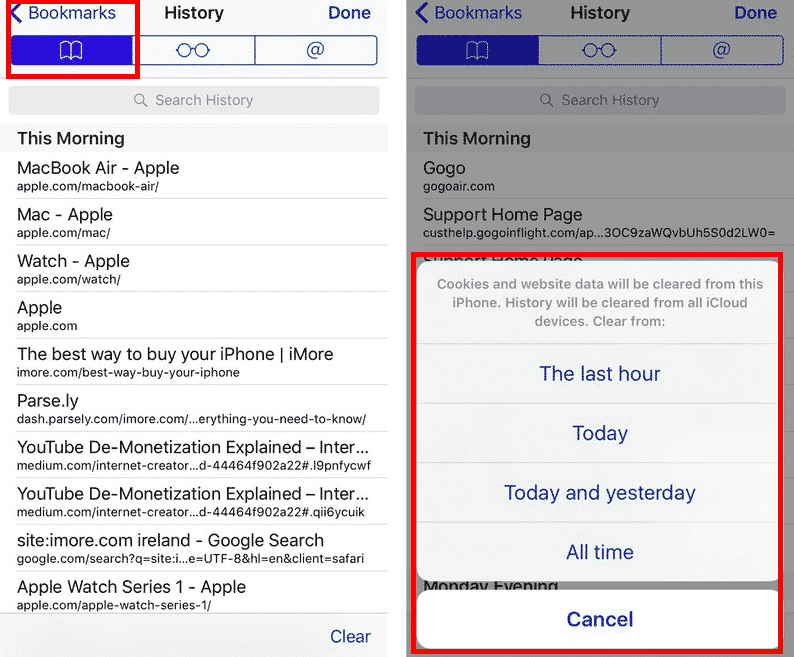
To Remove Selective iOS History Data On Safari
- Open Safari on your iPhone or iPad.
- Tap on the Bookmarks icon.
- Select History from the given options.
- Tap on Clear and choose the last hour, today, today and yesterday, or all history. To remove a single page, swipe left on it and tap Delete.
How To Remove Your iOS Search History On Chrome
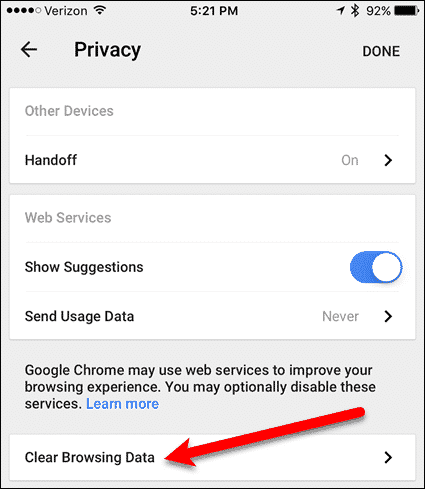
- Open Chrome on your iOS device.
- At the bottom right, tap the More button (3 dots).
- Select “Delete Browsing Data” (or “Settings” > “Privacy and Security” > “Delete Browsing Data”, depending on your version).
- In the prompt box, make sure to tick the box next to “Browsing history.“
- Choose the time period you want wiped and tap “Delete Browsing Data.”

How To Remove Your Search History On Android
- Open Chrome on your Android device.
- At the top right, tap the More button (3 vertical dots).
- Select “Delete browsing data” (or “Settings” > “Privacy and security” > “Delete browsing data”, depending on your version).
- In the prompt box, make sure to tick the box next to “Browsing history.“
- Choose the time period you want wiped and tap “Delete data.”

To Remove Selective History Data On Chrome For Android
- Open the Chrome app on your device.
- At the top right, tap the “More” button (3 vertical dots).
- Select “History.“
- Find the items you want to delete and tap the “X” next to them.
How To Remove Search & URL Predictions In Chrome

Remove Predictions On Mac & PC
- Open Chrome.
- Type the suggestion you want to delete.
- Highlight the URL you want to remove by using your keyboard down arrow.
- To remove the suggestion, press Shift + Delete (for Windows); Press Shift + fn + Delete (for Mac).
Remove URL Predictions On Android
- Open the Chrome app on your device.
- Type the suggestion you want to delete.
- Press and hold the suggestion.
- Tap “Delete” or “OK” in the prompt window.
Remove URL Predictions On iPhone & iPad
- Open the Chrome app on your iOS device.
- Type the suggestion you want to remove.
- Swipe left and click “Delete”.
Deleting Search History From Search, Maps, Google Now & Others

- Go to Google’s Web History page.
- Click on the “Filter by date & product” option next to the search bar.
- Select the Google products you want, such as YouTube, Chrome, Maps, and others, and click “Apply”.
- Click on the “Delete results” button to remove history from all of the selected products.
Google Now has been replaced by the Google app’s Discover feed, and its activity appears under the Google products in this list.
Removing Browsing History From Firefox, Microsoft Edge & Opera
Let’s now discuss the various other browsers.
Delete Firefox Browser History
- Open the Firefox browser.
- Press Ctrl + Shift + Del (Cmd + Shift + Delete on Mac) to open the history clearing window.
- Select the option according to the time range you want to remove.
- Check the items you want to delete (you can select all of them).
- Click on the “OK” button (labeled “Clear Now” in older versions).
Delete Microsoft Edge Browser History
Microsoft retired Internet Explorer in 2022, and Edge replaced it.
- Open the Microsoft Edge browser.
- Press Ctrl + Shift + Del to open Delete browsing data.
- Choose a time range and check the items you want to delete (you can select all of them).
- Click on Delete now.
Delete Opera Browser History
- Open the Opera browser.
- Click on the Menu button in the top left corner.
- Select History from the drop-down menu.
- Click “Clear browsing data”.
- To delete the entire history, select “All time” from the options.
- Check the boxes and click on “Clear data“.
If you are in the habit of frequently deleting your browser history, you may want to instead switch to Incognito Mode on your browser (Private Mode in Safari). This mode is otherwise known as “secretly looking for a gift for your spouse” mode, but it has its other uses too.
Conclusion
We have tried to list almost every method that will help you in getting rid of your browsing history. It is advisable to delete your web history on a regular basis, so you don’t have to worry when someone else uses your personal device.
We would love to read your suggestions on this article. Go to the comments section below to share your thoughts.
Get the week's tech news by email
One email a week with Trendblog's stories on AI, hardware, apps and crypto.
We'll email you to confirm your address. Unsubscribe any time. Privacy policy