
How to Do Big Text on Discord?

Tech news by email, once a week
Unsubscribe any time. Privacy policy
In this detailed guide, we’ll get into the world of Discord and look at different ways to make your messages stand out by making the text big. Whether you’re a regular user or the server administrator, being able to show text in bigger fonts can help you speak better and make a bigger impact.
So let’s get started and find out how to make the big text on Discord!
What is Discord?
Before we get into the specifics of big text, let’s quickly explain what Discord is for those who don’t know. Discord is a popular way for people with different hobbies and communities to talk to each other. It lets people join servers, which are like virtual hangouts where people can talk, share media, and do other things.
How to Do Big Text on Discord?
Big text is a great way to draw attention to specific words, lines, or even whole messages. It helps get people’s attention, shows how you feel, and makes your work more interesting. Big text is a great way to draw attention to an important point, add some creativity to your talks, or just stand out from the crowd.
Method 1: Using Discord Text Formatting
Discord supports Markdown headers, which are the built-in way to make big text. Type # and a space at the start of a line, and the line shows in large text. Use ## and a space for medium text, or ### and a space for smaller heading text. For instance, “# Hello” shows as a large Hello. The header symbol must be at the very start of the line and followed by a space, or it will not work. To go the other way, start a line with -# and a space to make small subtext.
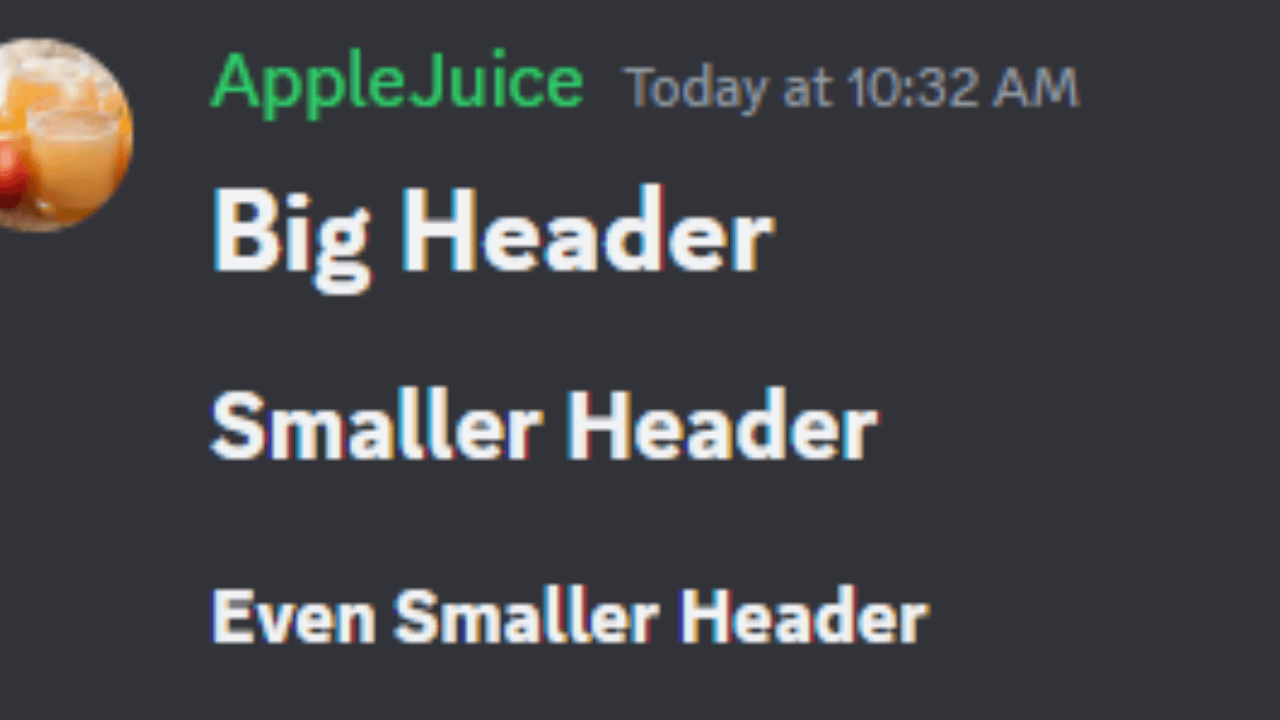
Other formatting options change the style of the text but not its size. Two asterisks make text bold, so **Hello** shows as bold Hello. One asterisk or underscore makes italics, and two underscores make underlined text, so __Hello__ shows as underlined Hello. Three asterisks, as in ***Hello***, give bold italics. You can combine a header with these styles, for example “# **Hello**” for large bold text, to find the look that suits your message.
Method 2: Using Zalgo Text Generator
Another smart way to get a big text on Discord is to use the Zalgo Text Generator. Zalgo text is a way to change the text by adding a variety of diacritic marks and symbols to it. The writing looks strange and interesting because of this.
You can make Zalgo text by going to sites like Zalgo Text Generator and typing the text you want. The creator will change the text into Zalgo, and you can copy and paste the new text into Discord. Remember that too much Zalgo text could make it hard to read, so only use it for certain things and not very often.
Method 3: Using ASCII Art
ASCII art is a way to use the ASCII letter set to make a picture. Even though it doesn’t directly make big writing, it can still be used to show big letters or words in a good way.
You can find groups of ASCII art on a lot of websites and with a lot of tools. You can look for letters or words written in ASCII and copy them into Discord to make the text look like it is big. ASCII art can help your words stand out and sound more like you.
Method 4: Using Bots and Custom CSS
Using Discord bots or custom CSS (Cascading Style Sheets) gives server admins and users with advanced skills even more ways to make big text.
There are different ways for bots like Dyno, MEE6, and Carl-bot to style text that can be used to make text look big. Most of the time, these bots need to be called to your server and given certain permissions.
Before we get into the details, it’s important to note that using bots and custom CSS requires a certain amount of technical knowledge. If you don’t know much about coding or running a server, you should ask experienced users or server admins for help.
Dyno, MEE6, and Carl-bot are all bots on Discord that have tools that let you use commands to organize text in your own way. Most of the time, big writing is what these bots are told to do. You can use these orders to make the text in your Discord messages bigger and more noticeable by following the instructions in the bot’s documentation.
For more skilled users, custom CSS can be added to Discord through third-party clients like BetterDiscord or BeautifulDiscord. You can change how things look in Discord, like the size and style of text, with custom CSS. You can change the CSS properties and use them in your Discord program to make your own styles, like big text.
Method 5: Using Unicode Characters
Unicode characters offer a wide range of symbols and letters that can be used to make big text effects on Discord. Using Unicode characters that are bigger or wider than normal characters can make your text look like it is big.

For example, you can use characters like (U+2588, Full Block) or (U+25A0, Black Square) to make big text that stands out. By repeating these characters or putting them together with regular text, you can make bigger letters or blocks of text.
It’s important to remember that different devices and systems may not have all Unicode symbols or may show them differently. What looks like a big word on one app might look different on another. So, the best way to make sure your chosen Unicode letters work the way you want them to is to test them on different devices and systems.
Conclusion
In this piece, we looked at different ways to make the big text on Discord. You can use Zalgo text, ASCII art, bots, custom CSS, Unicode characters, and Discord’s text style options to make your text stand out and get people’s attention.
Remember to use these ways sparingly and to think about how your words will be read and what they mean. People can understand each other better when there is a lot of text, but too much can be unclear or take away from the message.
Try out different ways to be creative, find your own style, and enjoy the many ways Discord gives you to be creative. You can improve your Discord experience and make your messages stand out by smartly using big text. Use these tips and big text to make your Discord profile more exciting and eye-catching. Have fun talking!
To read more content like this, visit https://www.trendblog.net.
Sources:
– [Discord support: Markdown Text 101](https://support.discord.com/hc/en-us/articles/210298617)
Get the week's tech news by email
One email a week with Trendblog's stories on AI, hardware, apps and crypto.
We'll email you to confirm your address. Unsubscribe any time. Privacy policy