

Cooler Master Qube 340 Review: Portable Mini-ITX Case Hits ~$55 Price Point

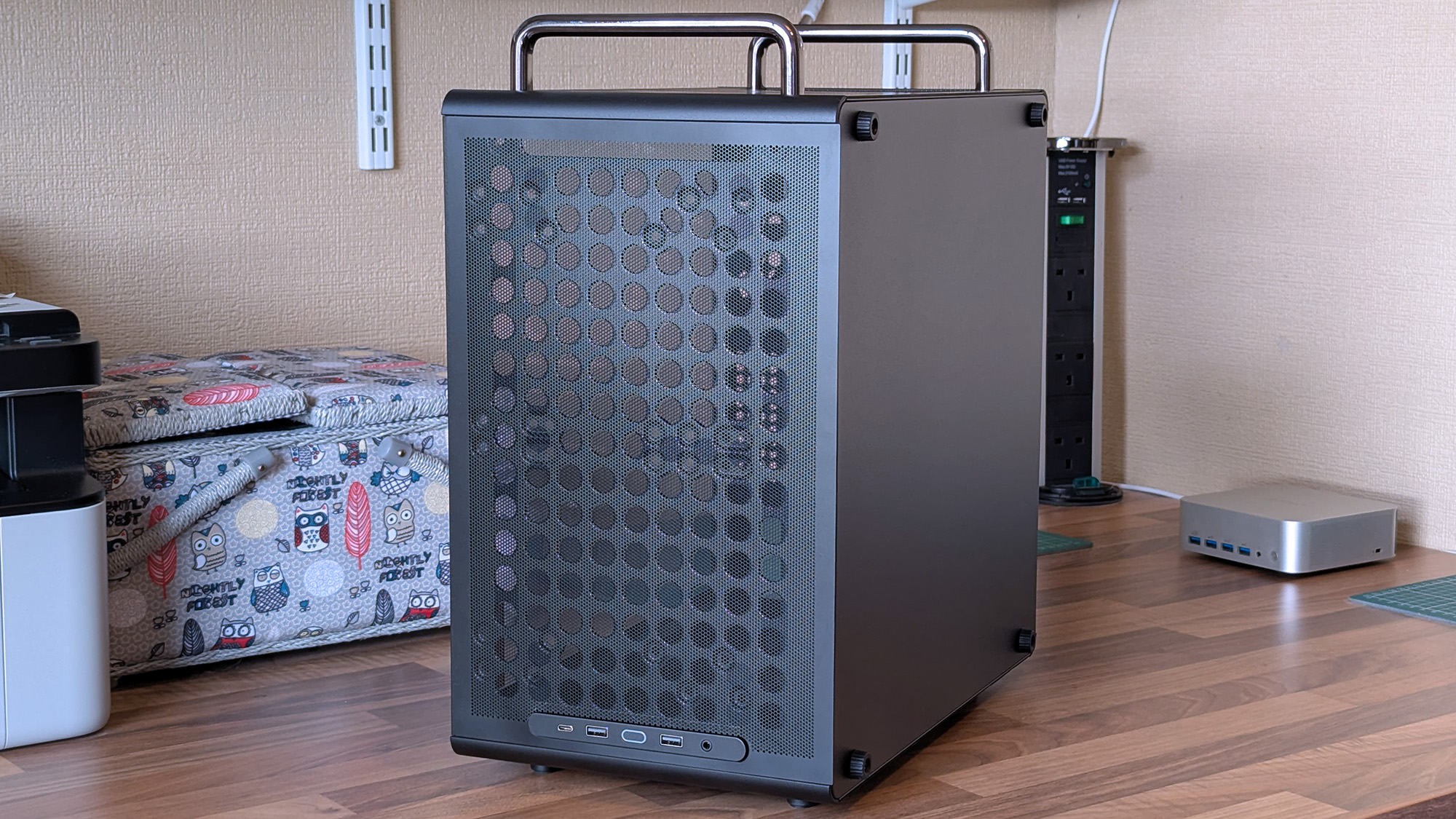
The Cooler Master Qube 340 is a compelling option for builders seeking a portable, compact mini-ITX gaming PC, offering excellent value and airflow despite some minor build quality compromises.
- Price: ~$55
- Dimensions: 386.1 x 230 x 429.4 mm
- GPU Clearance: 365mm
- CPU Cooler Clearance: 178mm
- Pre-installed Fan: 1x 140mm rear
Table of Contents
First Impressions of the Cooler Master Qube 340
So far, I’m thoroughly impressed with the portable Cooler Master Qube 340. The case appeared at Computex earlier this year, and I was immediately intrigued. Even without the budget for all the niche components required for a mini-ITX build just yet, Cooler Master impressed me out of the box.
I will need to acquire a compatible motherboard and other specific parts to complete a build. However, the initial impression of the Qube 340 is very positive. The Cooler Master Qube 3 is a compact case that seems well-suited for a small form-factor gaming PC build.
Portability and Design Features
Desktop gaming PCs are often quite large. The Cooler Master Qube 340’s removable handles are ideal for my plan to create a desktop that I can set up and take away at a moment’s notice. This allows for flexibility, rather than having a permanent fixture under a TV.
The case offers a compact design that is a stark contrast to many traditional, large desktop gaming PCs. The inclusion of removable handles makes transporting the build significantly easier. This is a key feature for those who might move their PC between locations or simply want to rearrange their setup frequently.
Component Compatibility and Airflow
My primary concern was whether my ASRock Challenger Radeon RX 9070 XT graphics card would fit, which depends on my front-fan configuration decisions. While an AIO radiator could be installed, the Qube 340’s “cheesegrater-esque” front panel design feels more suited to a traditional air cooler. A 140mm ‘DF1402512RFLN’ fan comes pre-installed at the rear.
At a glance, there is ample room for components. The 290mm graphics card fits with approximately 78mm of clearance.
I plan to use a single 140mm intake fan at the top to draw cool air into the case. This airflow path is designed to push air through a CPU air cooler before exhausting it out the back.
The case supports graphics cards up to 365mm and CPU air coolers up to 178mm. The front panel is designed for high airflow, and multiple fan and radiator mounting options are available to help maintain optimal system temperatures. This focus on airflow is a defining characteristic of the Qube 340.
Build Quality and Value
For the ~$55 asking price, Cooler Master is offering fantastic value. I am eager to acquire the remaining parts for a new rig.
While cable management is a primary concern, this is typical for any compact build. The somewhat flexible metal of the 2.5-inch SSD tray is preferable as I would not sacrifice routing space for vertical mounting.
The metal on the inside, particularly around the motherboard tray, is quite thin and exhibits some flex. However, it seems unlikely that I would accidentally bend it permanently.
The removable 2.5/3.5-inch drive tray is similarly thin and flexible, though it only needs to hold storage. This internal flexibility does not negate the overall strong value proposition given the price point.
The case generally features great build quality on the exterior, with sturdy carry handles and rubberized feet for stability. The glass side panel is secured by a single protruding tab, which requires careful handling. For a $55 PC case, the value is exceptional, even with minor concessions in internal metal thickness.
Where to Buy the Cooler Master Qube 340
Currently, the best place to purchase the Cooler Master Qube 340 is Newegg for $54.99. It is listed by Newegg directly, not third-party sellers, and is in stock. The black variant is available there.
A listing for the black Qube 340 on Amazon US indicates “Newegg Business” as a reseller at $59.49. This price is not worth the extra cost compared to the Newegg listing. At the time of writing, the white variant of this case is unavailable on Amazon and not listed on Newegg.
Who is the Cooler Master Qube 340 For?
I am determined to build a compact rig and found the Qube 340 looked perfect on paper for my mini-ITX ambitions. While I knew I would not achieve anything as tiny as some builds, this case offered a close approximation. The case is exactly what I wanted for my first mini-ITX build endeavor.
If you are considering a compact gaming PC that is easier to move than a full-sized desktop, the Qube 340 is a strong contender. While some opinions may shift after completing a build, the overall praise for Cooler Master’s offering remains high due to its affordability and design.
- ✅ You want to build a portable mini ITX gaming PC
- ✅ You’re prioritizing airflow with dust protection
- ❌ This is your first-ever rig; compact builds are tricky
Frequently Asked Questions
What are the dimensions of the Cooler Master Qube 340?
The Cooler Master Qube 340 measures 386.1 x 230 x 429.4 mm, including the handles and feet. This compact size makes it suitable for a portable mini-ITX gaming PC build.
How much does the Cooler Master Qube 340 cost?
The Cooler Master Qube 340 is available for approximately $55 at Newegg. Some other retailers may list it for slightly more, but this is the general price point.
What is the GPU clearance for the Cooler Master Qube 340?
The case offers GPU clearance of up to 365mm, provided the front fan configuration is considered. This is ample space for many modern graphics cards, including the RX 9070 XT mentioned.
What is the build quality like on the Cooler Master Qube 340?
The exterior build quality is generally great, but the interior metal, particularly around the motherboard tray, is thin and exhibits some flex. This is a minor trade-off for the affordable price of ~$55.
Worth it if… you are looking for an affordable, portable mini-ITX case with excellent airflow and features designed for compact builds.
Skip if… you require premium internal build materials or are uncomfortable with the challenges of building in a small form factor.
