

Acer Swift Air 14 vs. Dell XPS 13: Which $699 laptop is better?

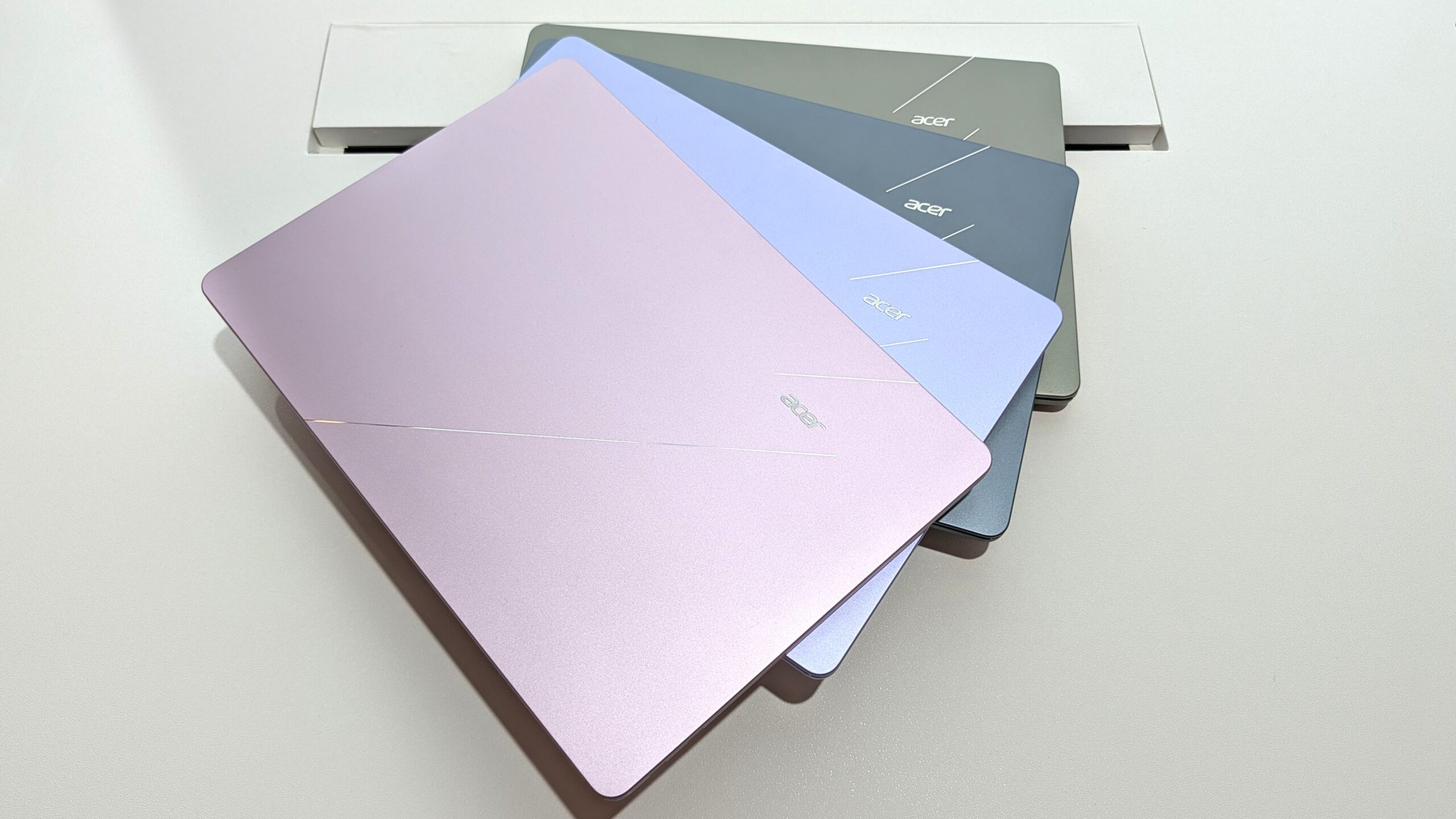
The Acer Swift Air 14 is the better buy for users prioritizing a larger screen and more ports, while the Dell XPS 13 offers a more premium display and lighter design for those on the move. Both laptops arrive with a focus on premium build quality at an accessible $699 price point.
Table of Contents
Design and Portability: Acer Swift Air 14 vs. Dell XPS 13
The Acer Swift Air 14 features a metal enclosure that feels premium to the touch, complemented by a large trackpad and excellent keyboard. Its dimensions measure approximately 12.36 inches wide, similar to older 13-inch laptops, and it weighs just 2.75 pounds (1.25kg).
In contrast, the Dell XPS 13 is narrower at 11.69 inches but slightly heavier at 2.2 pounds (1kg). Both devices share a thickness of around 0.5 inches, making them highly portable.
The Swift Air 14 offers four color options, including Sage Green and Frost Blue, while the XPS 13 comes in two colors: Storm and Sky.
Display: Acer Swift Air 14 vs. Dell XPS 13
The Dell XPS 13 boasts a 13.4-inch display with a sharp 2560×1600 (2.5K) resolution and a maximum brightness of 500 nits. Its anti-glare finish aids visibility in bright environments, and it supports a 30Hz to 120Hz variable refresh rate with Dolby Vision certification.
The Acer Swift Air 14 provides a slightly larger 14-inch screen with a 1920×1200 (FHD+) resolution and 350 nits of brightness. While it also offers a 120Hz refresh rate for smooth visuals, it lacks the higher resolution, variable refresh rate, and Dolby Vision found on the XPS 13 display.
Ports and Connectivity: Acer Swift Air 14 vs. Dell XPS 13
The Acer Swift Air 14 offers a more robust port selection, including dual Thunderbolt 4 ports, one USB-A 3.2 port, and a 3.5mm audio jack. For wireless connectivity, it utilizes Wi-Fi 6E and Bluetooth 5.3.
The Dell XPS 13’s port offerings depend on the configuration; some models feature dual USB-C 3.2 Gen 2 ports, while higher-end versions include two Thunderbolt 4 ports. It lacks a 3.5mm audio jack but supports more modern Wi-Fi 7 connectivity paired with Bluetooth 6.0.
Performance and Battery
Both laptops are powered by Intel Wildcat Lake chips, suggesting similar performance. The XPS 13 is currently available with a Core 5 320 chip, with a more powerful Core Ultra 7 355 expected. The Swift Air 14 is expected to offer a Core 5 320 or a Core 7 350 processor.
Dell’s XPS 13 features a 52Wh battery, rated for up to 17 hours of video streaming. The Swift Air 14 has a larger 70Wh battery, estimated to provide up to 19 hours of video playback. Both are expected to provide a full day’s use on a single charge.
Webcam and Security
Both the Acer Swift Air 14 and the Dell XPS 13 include 1080p webcams with IR sensors for Windows Hello facial recognition, offering a convenient layer of security. During initial hands-on testing at Computex, both cameras appeared to handle varying lighting conditions adequately.
There is little to differentiate these two laptops in terms of their webcam hardware. Both offer the integrated IR sensor for biometric login, a feature not always found on budget-friendly laptops and a valuable addition for enhanced security.
Keyboard and Touchpad
The Dell XPS 13 features a mechanical touchpad with a satisfying click and a more traditional keyboard design, moving away from its previous lattice-free style. Both the keyboard and touchpad are large and responsive.
Similarly, the Acer Swift Air 14 provides a comfortable typing experience with decent key travel. Its large touchpad also tracks accurately. Personal preference will likely dictate which keyboard and touchpad setup is preferred, as both brands have focused on delivering a quality user input experience.
Price
The Dell XPS 13 starts at $599 for students and $699 for general consumers, establishing a new market for affordable yet premium Windows laptops. Acer’s Swift Air 14 is also positioned in this segment with a starting price of $699.
Given the closely matched pricing, the decision between the two hinges more on specific feature preferences rather than significant cost differences. Both aim to deliver premium features at a value-driven $699 price point.
| Feature | Acer Swift Air 14 | Dell XPS 13 |
|---|---|---|
| Price | Starting at $699 | Starting at $599 (students) / $699 (general) |
| Display Size | 14 inches | 13.4 inches |
| Display Resolution | 1920×1200 (FHD+) | 2560×1600 (2.5K) |
| Display Brightness | 350 nits | 500 nits |
| Ports | 2x Thunderbolt 4, 1x USB-A 3.2, 3.5mm audio | 2x USB-C (2x Thunderbolt 4 on some models) |
| Wireless | Wi-Fi 6E, Bluetooth 5.3 | Wi-Fi 7, Bluetooth 6.0 |
| Battery | 70Wh (est. 19 hours video playback) | 52Wh (est. 17 hours video streaming) |
| Weight | 2.75 pounds (1.25kg) | 2.2 pounds (1kg) |
| Color Options | 4 (Sage Green, Frost Blue, Blossom Pink, Lilac Purple) | 2 (Storm, Sky) |
Which Should You Buy: Acer Swift Air 14 or Dell XPS 13?
The Acer Swift Air 14 is recommended for those who desire a larger 14-inch display for enhanced multitasking, a more comprehensive selection of ports including USB-A and an audio jack, and a wider array of color choices. Its starting price is $699.
The Dell XPS 13 is a strong contender for users who prioritize maximum portability, a higher resolution and brighter display, and the latest Wi-Fi 7 connectivity. It offers a premium feel and can be had for as low as $599 for students.
Frequently Asked Questions
Which laptop has a better design?
Both laptops offer premium metal builds. The Acer Swift Air 14 is slightly larger and heavier but offers more color options. The Dell XPS 13 is more compact and lighter, making it slightly more portable.
Which laptop has a better display?
The Dell XPS 13 features a higher resolution 2.5K display with 500 nits brightness, a variable refresh rate, and Dolby Vision. The Acer Swift Air 14 has a larger 14-inch FHD+ display with 350 nits and a fixed 120Hz refresh rate.
Which laptop has better ports?
The Acer Swift Air 14 offers more versatile port options with dual Thunderbolt 4, a USB-A 3.2 port, and a 3.5mm audio jack. The Dell XPS 13 primarily relies on USB-C ports, with Thunderbolt 4 available on higher-end configurations.
Which laptop should I buy?
Choose the Acer Swift Air 14 if you prefer a larger screen and more ports. Opt for the Dell XPS 13 if portability and a superior display are your top priorities.
Buy the Acer Swift Air 14 if: You need a larger 14-inch display for multitasking, appreciate having a USB-A port and 3.5mm audio jack, and want more color choices.
Buy the Dell XPS 13 if: You prioritize a lighter and more compact design, desire a sharper and brighter display with a variable refresh rate, and want the latest Wi-Fi 7 connectivity.
