


Last update: August 27th, 2013
Android and iOS are the most popular mobile operating systems on the market. Both offer a variety of apps and settings but, eventually reach their limits at a certain point. Rooting or Jailbreaking your phone (or tablet) will offer you thousands of tweaks, skins and new apps that you should not miss out on.
[one_half]
Table of Contents
Quick Links
- Rooting Terms
- ROM Versions
- How to Root
- Android 4.3 Root
- Custom Recovery Mode
- Custom ROMs
- Custom Kernels
- Root Apps
- FAQ
The first version of this guide was published in March and included a list of rooting terms you should know, an introduction on how to root an Android device and a few root-specific apps. This updated version includes new content based on the comments we received during the last months.
Android Launchers and lock screen widgets are great tools to customize your Android experience without rooting your device. You are also able to root your device and customize it with a launcher and widgets afterward.
This guide will use the Google Nexus 4 as an example but most of the things also apply to other Android devices. Some might require more work while others can be rooted quite easily, but in the end it’s no rocket science.
Android Rooting Terms You Should Know
Before we get started, I would like to explain a few terms because the terminology can get really complicated and confusing. This will help you to understand other device specific guides. I’ll try to keep it short and not go into (technical) details.
Bootloader
The Bootloader is your phone’s software foundation. It’s basically what runs before your operating system starts (like a PC’s BIOS). As many manufactures don’t want you to modify your phone’s OS, it needs to be unlocked before you are able to root your phone or install custom ROMs (explained later).
Brick
This is something you don’t want to happen to your Android device. Like the name already implies, a bricked phone (or tablet) can only be used as a paperweight or nice decoration for your apartment. Bricked devices are irreversibly damaged and won’t work anymore. This can, for instance, happen if damaged ROMs are installed or wrong firmwares are flashed. Always make sure to read instructions and verify checksums (a set of numbers that identify the file) to make sure nothing goes wrong.
BusyBox
Android, being based on Linux/Unix, offers a limited amount of UNIX commands (which most users won’t need anyways). BusyBox will implement more commands that are necessary for some root apps to work properly.
Custom ROM
A custom ROM is a modified version of the Android operating system. Tweaks, additional features, different themes or an enhanced performance are usually included. Custom ROMs also offer the possibility to use a newer, unreleased, version of Android on your phone that might usually not be available for your device because of restrictions from manufacturer or providers.
Fastboot
Fastboot is a diagnostic- and engineering tool which offers you several features such as launching in recovery mode or flashing image files.
Kernel
The kernel is the brain of your phone that controls how the system and hardware interact. It’s basically the lowest level of your operating system that manages memory and hardware.
NAND partition
NAND stands for “Negated AND” or “NOT AND” and describes the hard drive partition that stores all system relevant information like the bootloader, recovery mode or the kernel.
NANDroid backup
A NANDroid backup is a complete system backup of your Android device. This backup can be restored later and might save your phone after flashing a faulty ROM or theme.
Radio
The radio is responsible for sending and receiving voice and data. Using an optimized radio can improve your phone’s reception or increase battery life.
Recovery Mode
Recovery mode offers you the possibility to perform system-level tasks (like formatting, defragmenting, etc.), backing-up your devices or install custom ROMs. Android offers a limited stock recovery function. More sophisticated recoveries like ClockworkMod Recovery, 4EXT Recovery and TWRP Recovery offer additional features and are easier to use.
Root
Rooting will give you full administrator access of your device. It might also void your warranty (depending on the device and your place of residence), so make sure to handle your device with care after rooting it. You are always able to revert this process by simply flashing a stock-ROM (the original ROM installed by your phone’s manufacturer). Doing this will also “restore” your warranty.
S-OFF
S-OFF means that the NAND partition of your Android device is unlocked. This mostly applies to HTC phones.
Superuser
Rooting your phone will create a new “account” with complete administrative permissions. This superuser account is used by some apps and functions.
Understanding Custom ROM Versions
As Custom ROMs are constantly improved, they usually come in four different categories: Nightly, Milestone, Release Candidate and Stable.
Nightly
Nightly versions are usually generated every 24 hours and can be highly experimental and unstable. Especially early versions of a new custom ROM can have many bugs and missing features. If you want to have the latest features while risking instability – go for nightlies!
Milestone Snapshot
Milestone Snapshots are basically nightly versions that have reached a certain milestone. They can be regarded as being quite stable, but may include certain bugs and issues. Since they are only created every few weeks (or months), they won’t have the latest features that might be included in the nightly versions. If you are looking for the latest features while having a rather stable system, check out milestone snapshots.
Release Candidate
Release candidates, as the name already implies, are one of the last builds before the stable version of a custom ROM is released. RCs are mostly stable but might have a few minor issues. If you’re looking for something stable and ready for daily use, I would recommend to go with release candidates!
Stable
Stable versions are (obviously) the most stable versions around, with all or nearly all problems fixed. Some stable ROMs may still include some smaller issues or certain things not working. Stable versions are definitely the safest way to go, but it might take months before a new stable with new features or fixes is released.
How to Fully Backup Your Device Without Root
If your Android device is not rooted yet, you won’t be able to perform NANDroid backups. I wouldn’t suggest to root your tablet or phone without having a proper backup, because there is always a chance of error and you don’t want to brick your device.
Simple ADB Backup let’s you create a full backup of your device without root access and is the perfect solution for users without root access. The free program also offers a restore function and runs on Windows and Linux.
How to Root Your Android Device
The rooting process differs from device to device which makes it impossible to give general instructions on rooting here. I’ve linked guides for some of the most popular devices below. Using the terms described earlier should make the rooting process easier for you. If your phone or tablet is not on the list, you most certainly can find a guide on the XDA-Developers forums.
Google Nexus 4
Samsung Galaxy S3
Samsung Galaxy S4
HTC One
Samsung Galaxy Note 2
Google Nexus 7
Always make sure to perform NANDroid backups of your devices to be able to restore your phone or tablet to a working state. I would also recommend to validate checksums and carefully read through the instructions to avoid bricking your device.
Android 4.3 Root on Nexus Devices
If you’re running stock Android and want to root your device, you can either use a toolkit (if available for your device) or simply flash SuperSU in CWMR or TWRP, then wipe your regular and dalvik cache and you should be good to go.
The required .zip file to root your Android 4.3 device can be found here. The SuperSU app will make updating your root afterwards very easy.
Custom Recovery Mode
The standard Android recovery mode is very limited and does not offer many features. That’s where replacement recovery modes like the Team Win Recovery Project (TWRP) and ClockworkMod Recovery (CWRM) come in place. They offer the possibility to flash custom ROMs which is not possible with the stock recovery mode. Other features include a file browser for update.zips, adb shell and Nandroid backups.
It does not really matter which replacement recovery you install, just go with the one that suits you most. In some rare cases the root script or custom ROM installation only works with either TWRP or CWM.
TWRP – Team Win Recovery Project
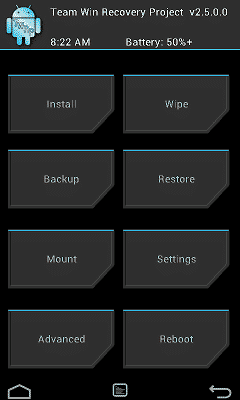
Team Win Recovery Project’s custom recovery offers an easy and touch driven user interface. It includes all typical recovery features needed to install custom ROMs, kernels, other tweaks and many more. You are also able to backup and restore your device using TWRP.
CWM – Clockworkmod Recovery
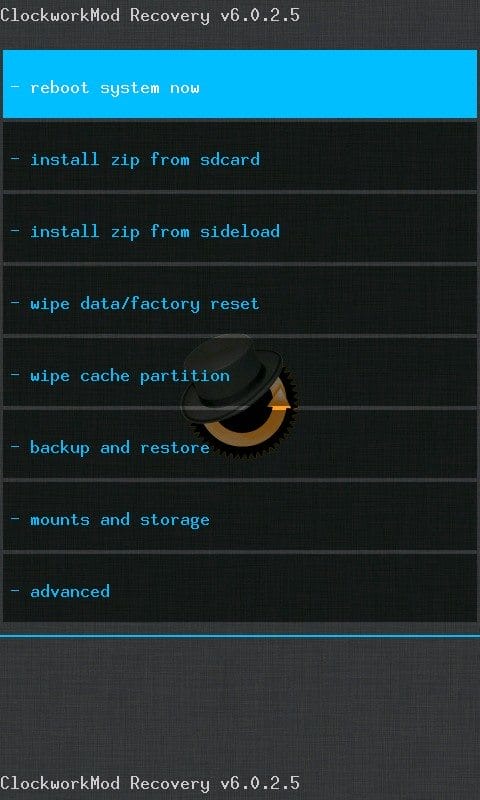
ClockworkMod Recovery is one of the most popular custom recovery modes. It also includes all advanced recovery features like installing custom ROMs and other files, as well as a backup and restore function. You can control the CWM UI via touch or key-input.
Custom ROMs
Custom Roms offer you a variety of new features, tweaks and visual enhancements. The best source to find a working one for your device is the XDA-Developers forum. Many custom ROMs are based on the three big releases: CyanogenMod, AOKP and Paranoid Android. The easiest way to find the best custom ROM for you is to compare their features or simply test them for a few days. To make your start easier, I’ve written a few words about the major custom ROMs below.
CyanogenMod

CyanogenMod looks very similar to stock Android, but offers several enhancements and tweaks. Besides increased system performance and reliability, it includes many interface enhancements and integrated features.
CyanogenMod Features
- OpenVPN integration
- Lockscreen gestures
- Expanded quick settings
- DSP equalizer
- Theme support
- Wi-Fi, bluetooth, and USB tethering
- CPU over- & underclocking
Latest CyanogenMod Version
Currently there are five versions available:
- CyanogenMod 7 – based on Android 2.3 Gingerbread
- CyanogenMod 9 – based on Androif 4.0.4 Ice Cream Sandwhich
- CyanogenMod 10 – based on Android 4.1 Jelly Bean
- CyanogenMod 10.1 – based on Android 4.2.2 Jelly Bean
- CyanogenMod 10.2 – based on Android 4.3 Jelly Bean
The first nightly versions of CyanogenMod 10.2 have been released and are available on the CyanogenMod download page.
CyanogenMod Project Nemesis
The CyanogenMod Team recently introduced Project Nemesis. Project Nemesis seeks to integrate new features to the CyanogenMod ROM that improve stock Android apps.
The first part of Project Nemesis was published on July 26th and is called Focal. Focal replaces the camera app and includes new features like:
- Widgets UI and sidebar
- Timers and burst mode
- Focus and measures light
- Picture review drawer
- Video snapshots
- Offline auto-enhancing
- Enhanced panorama mode
- Improved software HDR
- PhotoSphere for all devices
Focal is part of all CM 10.2 ROMs and integrated into nightlies.
CyanogenMod Availability
CyanogenMod is available for the majority of popular Android devices. You can find a list of supported devices on the CyanogenMod website.
AOKP

AOKP It describes itself as “Android infused with magical Unicorn bytes” – that should be awesome, right?
AOKP Features
- Added UI features and settings
- LED notification light options
- Performance tweaks
- Custom toggles
- Vibration patterns
- Flip phone to silence ringtone
- AOKP Ribbons
- Silent / Vibrate mode on face down
- New lock screen features
If you have some time at hand, you can also watch all features in this 47 minute long video:
http://www.youtube.com/watch?v=4tWDRcCyl90
If you’re into customization, AOKP offers tons of features. I especially like the custom vibration patterns: You can simply set a vibration pattern for, say, Emails, Hangouts and WhatsApp messages and can “feel” which type of message you just received (if you carry your phone in your pocket 😉 ).
Latest AOKP Version
There is currently one Milestone release available for 44 devices:
AOKP MR1 Milestone 2 – based on Android 4.2.2 Jelly Bean
The AOKP team is currently working on an Android 4.3 version. You will be able to install nightlies soon.
AOKP Availability
The AOKP custom ROM is currently available for 44 different devices. You can find a complete list on the AOKP website.
ParanoidAndroid

ParanoidAndroid is completely different to AOKP and CyanogenMod and one of the “newer” custom ROMs out there. The cool thing about PA? A true hybrid user interface: You are able to scale every app and part of the interface on your devices, choosing from PhoneUI, Phablet/Nexus7UI, and TabletUI.
ParanoidAndroid Features
- Hybrid user interface
- Floating notifications & multitasking feature called Halo
- UI customization
- Gesture controls
I especially like the Halo feature, which brings multitasking to a whole new level: Inspired by Facebook’s chat heads, you can switch between apps by simply choosing it in the Halo bubble. The Halo bubble shows pre chosen apps and recent notifications.
Apps will continue running in the background which makes multitasking quite convenient. This might affect your battery life and system performance negatively. Still something cool worth trying out!
Latest ParanoidAndroid Version
There are no real stable ParanoidAndroid releases available. Nightlies are updated every few days and offers Android 4.3 in some releases. The latest nightly release (as of Aug 27th) is 3.99.
ParanoidAndroid Availability
ParanoidAndroid is currently available for 16 devices. You can find the latest version on XDA-developers or via goo.im.
PAC-man ROM

So you sort of liked all custom ROMs described but can’t really decide which one to choose? Then PAC-man ROM might be the perfect solution as it is a combination of CyanogenMod, AOKP and ParanoidAndroid
PAC-man ROM Features
- All functionalities of CyanogenMod
- AOKP-based ROM controll, ribbons and other aspects
- ParanoidAndroid hybrid mode
Latest PAC-man ROM Version
There is currently one Milestone release available for 60 devices and a nightly version based on Android 4.3 for several devices:
PAC Milestone 1 – based on Android 4.2.2 Jelly Bean
PAC Nightly – based on Android 4.3 Jelly Bean
PAC-man ROM Availability
You can download PAC-man ROM on the official website.
Flashing Custom Kernels
Kernels are the brain of your Android device and communicate between software and hardware. Therefore, they are responsible for managing things like CPU / GPU clocking speed, screen sensitivity / colors or voltage. By using a custom kernel you can not only improve battery life, but also increase system performance.
Many custom ROMs already come with their own kernels. This is done to implement software communication of the custom ROM with the hardware of the device and also to ensure a better performance. Nevertheless, you are often also able to flash custom kernels to custom ROMs. If you decided to stick to a rooted version of stock Android, flashing a new kernel can offer you additional performance with the convenience of a stock OS.
Always make sure to check compatibility of the kernel with your ROM and device, because flashing a wrong kernel can brick your phone!
There are different ways to flash a custom kernel to your device like flashing in recovery mode or using an app. I personally use franco.Kernel in combination with CyanogenMod on my Nexus 4 and couldn’t be happier. I’m able to check for kernel updates using an app. The same app also offers downloading and auto-flashing the latest version to my phone.
My experience with franco.Kernel so far is great: Heat-issues are fixed, the display colors look more like the AMOLED display of the Samsung Galaxy S3 and I have roughly 50% more battery life.
Apps
Rooting your Android device will offer you many benefits. Besides the features mentioned above, you can also install great apps that require to go deep into the system. Using them with an un-rooted device is not possible. Below I’ve listed a few apps that I like and use on an everyday basis. Feel free to share other apps in the comments section below!
Titanium Backup
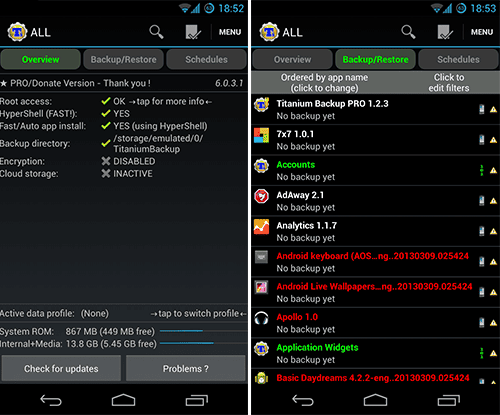
Titanium Backup is a great backup tool for Android devices that offers tons of features. It provides the possibility to backup your data, settings and apps. Scheduled backups are also available. The paid pro version offers lots of great features like syncing backups with cloud-based storage providers such as Dropbox, Google Drive or Box.
ROM Manager
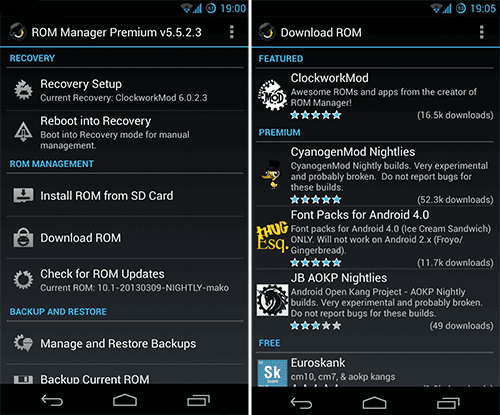
When you constantly switch between custom ROMs, ClockworkMod’s ROM Manager is one of the essential apps to get. Besides flashing ClockworkMod recovery, it will help you to organise and install your custom ROMs and backing-up your Android device. The paid premium version includes additional features like automatic backups, web connect and incremental ROM downloads.
AdAway
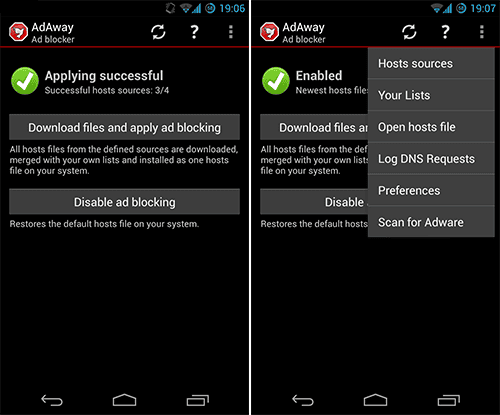
I struggled a little bit when deciding to either include AdAway or not, because it’s great for users but bad for app publishers and marketers. Google removed it from Google Play but you can still get it on the AdAway website. Like AdBlock Plus on your computer, the app modifies your Android devices hosts file to prevent apps and browsers to display advertisements. This will not only improve your app usage experience, but also increase battery life and decrease mobile traffic. Be fair and purchase paid versions of apps or donate a small amount to developers to make sure they will keep on programming great apps!
Google has recently begun to remove certain apps that violate their distribution agreements from Google Play. If you’re still interested in installing AdAway, please refer to the AdAway website.
Cerberus anti theft
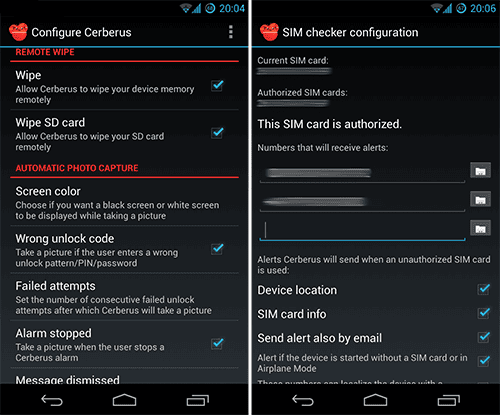
Cerberus anti theft is a great app that brings many security features to your phone. You can, for instance, control your phone remotely from the Cerberus website, locate and track it as well as display messages on the screen. Remote wiping and taking pictures of the thief are also on the huge list of features.
This app will work on non-rooted devices, although the root version implements and essential feature: Cerberus can be installed wipe-proof which means that a thief won’t be able to simply uninstall the app or notice that it’s running in the background.
Touch Control
I love my Nexus 4, but sometimes it’s really annoying that I have to hit the physical buttons to unlock the screen. Touch Control allows you to wake up and lock your device by using gestures: Simply double-tapping the display will wake up the display. A swipe from right to left will lock the screen when the device is running. A great app that increased my Nexus 4 user experience big time.

Greenify
Greenify is a great app to improve battery life and system performance because it puts selected apps in hibernation mode. Not having tons of apps stored in RAM or running as system processes will make your Android device faster and increase your user experience. Please refer to full review for more information.

Frequently Asked Rooting Questions
1. How can I restore stock Android?
To get back stock Android, simply flash a stock ROM suitable for your device. This way you’ll get an unrooted, stock Android version with restored warranty.
2. What happens to my settings, contacts and apps when I install a custom ROM?
It’s always recommended to wipe your device before installing a custom ROM for the first time. If your Google account is linked to your phone, contacts, emails and apps will automatically be downloaded after launching the custom ROM and logging in to your Google account. You can backup your settings with apps like XYZ.
3. How can I upgrade a custom ROM?
Most custom ROMs offer a update function, some directly integrated to the OS, others using a specific app. You can also use ROM Manager to update certain custom ROMs.
4. Is it possible to just root a phone and not install a custom ROM?
Yes, simply use a stock ROM and root it. If you update it, your root-access will be gone, though.
5. Do I need to go step-by-step to upgrade my Android device or can I directly go to the latest version available?
You can usually simply flash the latest ROM and are good to go. Custom ROM updates usually come in a full package, meaning that you have to download the complete ROM to update it. The downloads are usually about 100-200 MB.
Final Words
Do you have any questions about the rooting process, custom ROMs, tweaks or apps? Do you maybe want to share other great apps that I might have forgotten? Feel free to do so in the comments below!

Building native iOS and Android apps is no longer a problem. DIY platfroms like SnAPPii can help you create your own app in hours without difficulties in submitting apps to stores. An ability to connect those apps to any web services makes them a good alternative to custom developers’ apps
Please answer me this question:
For the first time I left the StockRom of the Samsung Galaxy S3 i9300 and installed the CM 10.1. Why the strong tone of the screen colors gone? In stock colors were warm and strong as a SuperAMOLED screen, the custom is not so.
use paranoid android
its settings on screen will make that
Thank you Fafa! I will try 😀
I have unlocked my bootloader; Flashed the latest CWM; And rooted my One S;
But when I try to install a custom rom, the installation reads “complete” but in reality the update process lasts about 10 seconds and my phone gets stuck on the boot screen.
I’ve tried numerous roms, and I have done them all after re-downloading the zips, copying zips to sd, wiping data/cache/system. None will install. What is going on?
where can I find custom roms for XOLO Q800 ?
Androidjugaad.com is one place where you fnd everything about xolo Q800
My phone is unlocked to use different carriers, will rooting or installing a custom rom lock it again?
Hi i have a galaxy S2 and i want to flash it to 4.2.2. i have previously flashed a unofficial 4.1.2 build and my phone got locked asking for a network code. I gave it for unlocking and it worked fine now i want to flash my device with Cyanogen Mod and use it will it work.If it gets locked again how will i unlock it. Is there a procedure to unlock phone. Please revert
Hi,
I have a Samsung Galaxy S2 i9100 and I was able to flash it with any official stock ROMs without rooting (no questions asked, since i9100s come with unlocked bootloaders by default:)) with Odin 3.07. The question is, is it also possible to flash it with custom ROMs without rooting just like I flashed the stock ROM? Thank you very much in advance.
Hi there,
You’ll need to install a custom recovery to flash a custom ROM. Since you’ll need root access for that, you have to root it.
Hope that helps!
hey!!!,
i have micromax a35 bolt phone…..i want to root it….so how can i do it?? what all apps do i need for it..
u can use unlockroot… http://www.unlockroot.com/download.html
franco kernel for 10.2 also released!
franco kernel for 10.2 also released!
hi,
sir plz help me? i buy micromax a35 its to slow and hang. what is reson. and how its solve
Sir….How to unRoot my phone plz plz help meme..it working slow
Flash to original firmware and the root should be gone!
Hi, I want to clarify one thing, i had rooted my mobile Sony Xperia T LT30P, After that i had installed Custom Rom through CWM Recovery, I had Done Everything which was mentioned below: After the Last Step, My mobile is not getting switch on…???? wat is the problem, can i able to Fix this Error, How can i fix, i need your Help….??? Plz can u Help Me…..????
Instruction How To Install Android 4.2.2 Jelly Bean Based CM10.1 RC4 ROM On Sony Xperia T LT30p :1.First, you must download CM10.1 RC4 ROM for Sony Xperia T and Google Apps (Filename: gapps-jb-20130301-signed.zip).
2.Now, connect your Xperia T to PC using USB cable and then mount your storage first.
3.Once you manage access of your phone SD card content from your computer, copy downloaded zip files to the SD card of your phone. Important: Don’t extract any file.
4.Once you finish file transfer procedure, disconnect USB and then turn off your phone.
5.Boot into recovery mode. To do so,
first power on your device and when purple LED light is on, press Volume
Up continuously until boot into Recovery mode [use volume buttons to
scroll and Power button to select].
6.As we mentioned earlier, it’s important
to perform a Nandroid backup of your existing ROM that you can restore
later if this new ROM not work or you want to go back. To perform a
Nandroid backup, select Backup and Restore, then on the next screen, select Backup again. Go back to main recovery menu after backup process done.
7.It’s time to perform some wiping task to eliminate clash between new ROM and previous ROM. To do so, first select wipe data/factory reset, then select Yes
on next screen to confirm your action. Wait few minutes till the data
wiping process done. Now come back to CWM recovery main menu. Select wipe cache partition and after wiping cache partition process completed, select Wipe Dalvik Cache under advance option to perform Dalvik cache wiping. When all done, it’s safe to move into next step.
8.Select install zip from sdcard, then select choose zip from sdcard. Now, locate the CM10.1 ROM zip file that you copied earlier in Step 3 and select it by pressing Power button. Confirm installation on next screen and soon the ROM installation procedure start.
9.Once the ROM installation process end, repeat the step 8 but choose gapps-jb-20130301-signed zip file instead of ROM zip to install the Google apps package.
10.When all done, you should go back to the main recovery menu and select reboot system now to reboot the smartphone. The phone will then boot into this new ROM, however you should note the first boot usually take time usually about 5 minutes.
After this step, it is not getting switch on, Need your help….?????
Is there any other Solution for that, Plz Help me how to do it, Waiting for your Reply, Kindly Help me as soon as Possible, this is the Link which i followed step by step: http://design-extreme.net/how-to-install-android-4-2-2-cm10-1-rc4-custom-rom-on-sony-xperia-t-lt30p/, I Hope you can understand my Problem and help me…????
Can i flash anything without rooting? Im using Htc one and i want to to flash emoji keyboard. Its a new phone so i want to keep the warranty for now.
Hi i have micromax canvas2.
Its motion sensor not working.
Do rooting help me?
Hello sir i have a samsung tab 8.9 which i want to root it. However i try it give me t
he option of “apply from external which i cant access it pls help me? I s there a way to make and received calls with it?
Hi Philipp Greitsch can u help me…????
OK so I just put a new ROM on my nexus 7 not the new one but it says that I have a system update downloaded and ready to install I’m wondering if its safe to install
Cyanogenmod does not provide Lockscreen gestures anymore. 🙁
I successfully rooted my Samsung Galaxy S3 phone (SCH-R530C, Android version 4.1.2). So far, I have downloaded Titanium Backup, Tether, Root Uninstaller, Pimp My Rom, RootAppDelete and Theme Manager.
I have been able to get rid of apps that I no longer want, but that is all I have been able to do.
How do I get the themes to work? I have selected some, downloaded some, rebooted, but nothing has changed.
Is there anything else I have to do besides rooting my phone?
Thanks very much for any help.
I put a ROM in galaxy ace s5830i and now it is not starting and restore is also not working…is my phone dead or there is some alternative available?
I rooted my S3 with CM 10.1 but I would like to have some of the original apps of samsung. I have found the apks but I’m unable to install them. Any ideas?
Hi, i have a nexus 4 Running on Cyanongenmod 10.1 ( android 4.2.2 ) and i want to remove this version and install a simple pur Android 4.3 version, how can i do this please ? is there any danger ?
Problem: WiFi not working! Flashed Slim-4.3.build.1-OFFICIAL-878 on my GT-I9300 phone. In the WiFi list I can see all the wireless networks available and I can enter the password for these. Then I get the name of the network followed by: Saved, secured with WPA/WPA2 for a while and the this text disappears. So I have ex MyNetwork(tried 4 diff. networks) and the reception shown but I don’t have the WiFi beamer in the top curtain showing that I have any connection with WiFi and so I have to use mobile data. There is no wireless internet connection.
I also tried Supernexus, CM, Liquid smooth, Android revolution but I had the same problem. I tried to factory reset, dalvik cache and partition wipe many times for all of them but still the same. I tried to installl another kernel but then the mobile connection disappeared too. What to do, do you need any further information to resolve this?
After having flashed 15-20 ROM’s it finally works! Wifi; yes. Mobile network; yes
Only by flashing: cm-10.2-20130927-NIGHTLY-i9300.zip
hi there im trying to flash my samsung galaxy ace to it original firmware but i always have a problem with the usb connection is there any other way of doing it ?
Hi, i have a galaxy s3 with stock firmware 4.1.2, can i flash a custom rom based on jb 4.2.2?
after rooting samsung gt n7000 4.1.2 to 4.3 jeally bean again can i get samsung features back .if there is an option let me know plz…
i installed the new custom rom on my xperia neo v from the followig link: http://forum.dailymobile.net/index.php?topic=92109.0
the installation worked fine but after that when i rebooted my phone, then it got stuck at the sony ericsson logo. pls help me as i am not able to boot my phone. pls pls pls pls help me
Actually i have installed android 4.2.2 software on my samsung galaxy y s5360 . Before it was jellybean 4.1 android version. After the installation my device get stocked,still now it won’t get start . I have been changed the battery and try to start again but it didn’t work . Plz kindly let me know,what should i do to start my device again ?
Plz let me know ,what should i do to restart my device ?
I have a SoftwinerEvb tablet Android 4.1.1. which can not do screenshots. I tried Icecold and other suppliers, no success and no response from Icecold which claim to send PC sw to manage screenshot installation. Page fails.
How can I backup system I case I mess-up trying some other system software, preferably to SD card to keep it away while kicking o/s.
I made a copy of the whole internal memory on my SD card, don’t know if this is any use.
How would I know if a particular o/s version will do the screenshots.
414, kernel 308+, build nuclear_evb 4.1.1 ….. test keys
I’m a bit new to Rooting devices, but Can I just root a device and change its kernel without altering the stock rom?
i successfully rooted my karbonn a2+ ics but so many times bricked my mobile.. but im not sad i reinstall stock rom then i tried many ways rooting my mobile.. but i need cmw recovery.img for MT6575 device.. i need your help guys.. i have mobileuncletool,mtk driod tools..etc i already tried rom manager but not support for me.. i need unofficial cmw recovery for karbonn a2+..
t
hanks you very much for your any help!!
Hi there,
Have you checked this website? http://www.clockworkmod.com/rommanager
Why exactly do you need CWM recovery? Have you tried TWRP?
Also check out my first aid guide (https://trendblog.net/fix-soft-bricked-android-device-first-aid-guide/) – maybe it will help you!
I’ve just rooted my newly purchased iBall Andi4Di fon and took a system backup using CWM, now my question is how to find out which custom ROM suits this fon? Can flashing a wrong version brick my fon?
Sorry for sounding naive but i really dont want to brick my fon, so jus being cautious..
Any help is greatly appreciated..
this is amazingly helpful.
I have a peculiar problem. I changed the phone’s External SD Card into Internal SD Card and moved most of the apps in it. I just installed CWM and when i switched the phone on, there is no Internal SD Card folder with all apps including ROM Manager, SU, etc., in it. Only the External SD Card which was earlier the Internal SD card can be seen. Also, the factory built apps cant be updated as it cites insufficient storage. Any help would warmly be appreciated!
hi in recovery mode in samsung s5830i it shows only 4 items
1. reboot system now
2. apply update from sdcard
3. wipe data/factory reset
4. wipe cache partition
instal from sdcard is missing please help
Hi there, I have a S3 GT-I9300 Movistar Vzla Stock (I9300UBEMH1) 4.1.2, I had a problem with the phone because it freezes many times so I was recommended to root it and load a new ROM because it was a software issue I had the stock 4.1.2(I9300UBEMH1), now my question is, It is possible to load an 4.3 stock UK Vodafone version(I9300VFGGMK4) been rooted with another country 4.1.2? or I have to use a custom version?, If I use a stock newer version and something not working ok, can I go back to the stock original version? the extra news is that I only found for my country the stock version of 4.1.2 Movistar Vzla (I9300UBEMI1) . I have to worry or is possible to load that version too?
great summary.
how should i update my gt-s5302 to 4.2
i rooted my phone GT-S5301 plus.. and when i give like 2 order’s.. the the phone stop working.. i must remove the battery and put again and turn the mobile on.. what can i do please 🙁
Don’t mess,if it isn’t broke don’t fix it,don’t bother messing,its all rubbish,you will only brick your phone,which you have done,throw it away and stop messing,you gust wasting money on rubbish rooting firmwares,if you don’t like the ndrtoid you got don’t buy it
If you don’t like stock android why buy it in first place
i’m using galxy ace-i (s5830i).
I done with rooting, ClockModRecovery m, custom rom (acecream v1.3)….
but in this acecream rom, i cant enter into download mode…
now my mobile kernel version is 2.6.35.7
rafael@baugis#1…
this rom is working perfectly but i cant get back to stock rom with this kernel..
please help me to flash original stock rom in my s5830i…
I can enter straight away into Clockmod recovery instead of stock recovery but doesn’t enter into download mode..
I had successfully rooted my android phone Sony Xperia Neo L. Flashing with custom rom. It was running great till i tried updating my phone with sony companion. My phone got updated, but i lost my root access. Now i cant root my phone anymore. Is there any way I can root it again?
Can you access the custom recovery mode? If so, try flashing SuperSU there. I’ve explained the steps here: https://trendblog.net/fix-soft-bricked-android-device-first-aid-guide/